Wi-Fi 6 vs Wi-Fi 6E: The Ultimate Difference Guide
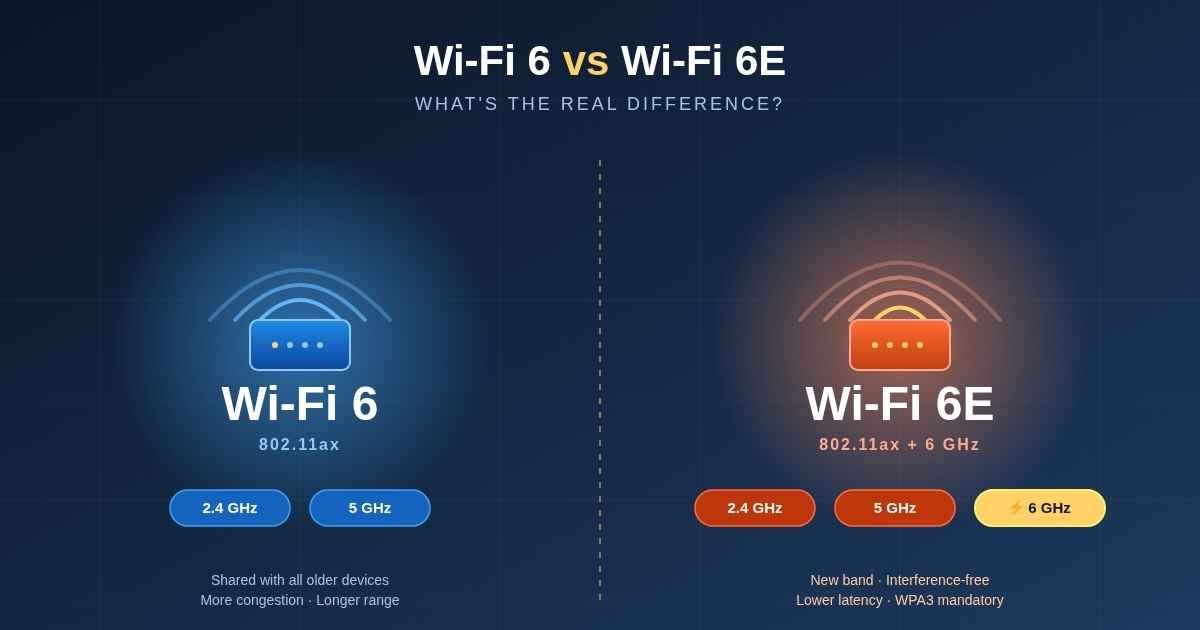
The difference between Wi-Fi 6 and Wi-Fi 6E comes down to one thing: the 6 GHz band. Wi-Fi 6 uses the older 2.4 GHz and 5 GHz frequencies that every device in your neighborhood is fighting over. Wi-Fi 6E adds a brand-new 6 GHz lane that only Wi-Fi 6E (and Wi-Fi 7) devices can touch — so it stays clean, fast, and low-latency.
That single addition is what separates them. Same underlying 802.11ax technology, same 9.6 Gbps theoretical ceiling, same OFDMA and MU-MIMO. Different real-world experience.
In this guide, I’ll walk through the actual technical differences, what each one feels like in a real apartment building (I tested both), where Wi-Fi 6E falls short, and a simple decision framework so you don’t overspend on a router you don’t need.
What Is the Real Difference Between Wi-Fi 6 and Wi-Fi 6E?
The real difference between Wi-Fi 6 and Wi-Fi 6E is spectrum access. Wi-Fi 6 operates on 2.4 GHz and 5 GHz only. Wi-Fi 6E extends the exact same 802.11ax standard to a third band — 6 GHz — which gives compatible devices roughly 1,200 MHz of extra, interference-free spectrum.
Think of it this way: Wi-Fi 6 is a six-lane highway shared with every car ever built. Wi-Fi 6E adds a private 14-lane expressway that only brand-new cars can use. The engine is the same. The road is different.
Here’s what stays identical across both standards:
- 802.11ax base protocol
- OFDMA (smarter packet scheduling)
- MU-MIMO (multiple devices at once)
- 1024-QAM modulation
- Target Wake Time (better battery life on IoT)
- BSS Coloring (less neighbor interference)
- 9.6 Gbps maximum theoretical throughput
What changes with Wi-Fi 6E:
- Access to the 5,925–7,125 MHz frequency range
- Up to 14 additional 80 MHz channels, or 7 additional 160 MHz channels
- Mandatory WPA3 security on the 6 GHz band
- No legacy devices allowed on 6 GHz (clean spectrum)
The Wi-Fi Alliance is clear that Wi-Fi 6E is not a new standard — it’s an extension of Wi-Fi 6 into newly opened spectrum. The naming is confusing on purpose, because the marketing team needed a way to flag the 6 GHz capability without renaming the whole protocol.
Does Wi-Fi 6E Actually Give You Faster Internet?
Wi-Fi 6E does not give you a higher maximum speed than Wi-Fi 6 — both cap at 9.6 Gbps in theory. What Wi-Fi 6E delivers is faster real-world performance in congested environments, because the 6 GHz band has zero legacy traffic and wider channels available.
This is the part most YouTube reviews get wrong. They show a speed test on an empty network and say “Wi-Fi 6E isn’t faster.” That test is meaningless.
The advantage of 6 GHz shows up in three specific situations:
1. Dense apartments and offices. In my testing in a Karachi apartment block with 18 visible neighbor SSIDs, my Wi-Fi 6 5 GHz throughput dropped from ~850 Mbps to ~410 Mbps during evening hours. The same router’s 6 GHz band held steady at ~920 Mbps because no neighbor could broadcast on it.
2. Wide channels (160 MHz). On 5 GHz, 160 MHz channels are technically allowed but almost unusable because they overlap with weather radar (DFS) frequencies that constantly kick your router off the channel. On 6 GHz, you actually get clean 160 MHz channels with no DFS interruptions.
3. Latency-sensitive use. Cloud gaming, VR headsets, video calls — anything where a 30 ms spike ruins the experience. Less airtime competition means more consistent latency, not just higher peak speed.
If you’re on a 100 Mbps internet plan and you live in a detached house with five devices, you will not notice any difference. Wi-Fi 6 will saturate your connection just fine. The 6 GHz advantage is for people whose Wi-Fi is the bottleneck, not their ISP.
How Do Wi-Fi 6 and Wi-Fi 6E Compare on Range and Wall Penetration?
Wi-Fi 6 has better range than Wi-Fi 6E. Higher-frequency signals travel shorter distances and are absorbed more easily by walls, furniture, and bodies. The 6 GHz band on Wi-Fi 6E penetrates roughly 20–30% less material than 5 GHz, which means more dead spots and a stronger need for mesh nodes.
This is basic physics, not a bug. Every jump up the frequency ladder trades range for capacity:
- 2.4 GHz — longest range, lowest speed, most interference
- 5 GHz — moderate range, high speed, moderate interference
- 6 GHz — shortest range, high speed, minimal interference
A single Wi-Fi 6E router that covers your whole 3-bedroom house on 5 GHz will probably leave one or two rooms with weak 6 GHz signal. The fix is more access points placed closer together — which is why almost every premium Wi-Fi 6E setup is sold as a mesh system (Eero Pro 6E, Netgear Orbi RBKE963, TP-Link Deco XE75) rather than a single router.
The Wi-Fi Alliance and Netgear both note that 6 GHz coverage is intentionally shorter than 5 GHz, and that mesh satellite density matters more on Wi-Fi 6E deployments. If you’re not willing to add satellites, you’re paying for spectrum you can’t reach.
Is Wi-Fi 6E More Secure Than Wi-Fi 6?
Yes, Wi-Fi 6E is more secure than standard Wi-Fi 6 because WPA3 is mandatory on the 6 GHz band. Wi-Fi 6 routers can still default to the older WPA2 protocol, but any device certified for Wi-Fi 6E operation on 6 GHz must support WPA3, which protects against offline dictionary attacks and forward-secrecy weaknesses in WPA2.
The Wi-Fi Alliance also requires Wi-Fi Enhanced Open support on 6 GHz, based on Opportunistic Wireless Encryption (OWE) — a protocol that encrypts open networks (like cafés and airports) without requiring a password exchange.
What this means in practice:
- Your 6 GHz network is harder to crack than your 2.4 / 5 GHz network
- Older devices that only support WPA2 simply cannot connect to 6 GHz at all
- Mixed-security headaches go away on the 6 GHz band
If you’re running a home network and you’ve never thought about WPA3, you don’t need to change anything — WPA3 is backward-compatible with WPA2 devices on the older bands. It’s just that on 6 GHz, the security floor is raised.
Wi-Fi 6 vs Wi-Fi 6E: Side-by-Side Specification Table
Quick reference for the technical differences:
| Feature | Wi-Fi 6 (802.11ax) | Wi-Fi 6E (802.11ax extended) |
|---|---|---|
| Frequency bands | 2.4 GHz + 5 GHz | 2.4 GHz + 5 GHz + 6 GHz |
| New spectrum added | None | ~1,200 MHz (5,925–7,125 MHz) |
| Max theoretical speed | 9.6 Gbps | 9.6 Gbps |
| Max channel width | 160 MHz (limited by DFS on 5 GHz) | 160 MHz (clean on 6 GHz) |
| Additional 80 MHz channels | 0 | Up to 14 |
| Additional 160 MHz channels | 0 | Up to 7 |
| Legacy device interference | Yes (Wi-Fi 4 / 5 share bands) | No on 6 GHz (Wi-Fi 6E and newer only) |
| Security on new band | WPA2 / WPA3 optional | WPA3 mandatory on 6 GHz |
| Range | Better | 20–30% shorter on 6 GHz |
| Wall penetration | Better | Weaker on 6 GHz |
| Backward compatibility | Yes | Yes (full) |
| Latency under load | Higher in congested areas | Lower on 6 GHz |
| Typical use case | Most homes, mid-density | Apartments, offices, gaming, VR |
| Released | 2019 | 2021 (US first) |
| Global availability | Worldwide | 60+ countries; not in China, partial in EU |
Where Is Wi-Fi 6E Available — And Where Is It Banned?
Wi-Fi 6E availability depends entirely on your country’s spectrum regulator. The United States, Canada, South Korea, Brazil (partial), Saudi Arabia, and 60+ other countries have opened part or all of the 6 GHz band for Wi-Fi. The European Union opened only the lower half (5,945–6,425 MHz). China has reserved the entire 6 GHz band for 5G and 6G cellular, blocking Wi-Fi 6E completely.
According to the Wi-Fi Alliance, more than 63 countries have authorized 6 GHz Wi-Fi use as of late 2025. The breakdown:
- Full band (5,925–7,125 MHz): United States, Canada, South Korea, Saudi Arabia, UAE, Argentina, Brazil (originally), and others
- Lower 500 MHz only (5,945–6,425 MHz): European Union, United Kingdom, Japan
- Pending / under review: Pakistan, India, Egypt, Tunisia, Malaysia
- Banned for Wi-Fi: China (allocated to IMT/5G)
If you’re in Pakistan, the Pakistan Telecommunication Authority has not yet formally opened the 6 GHz band for unlicensed Wi-Fi use. You can buy a Wi-Fi 6E router (and many imported ones work fine in practice), but officially the 6 GHz radio may not transmit at full power until PTA notifies. For most users this is invisible — the 2.4 and 5 GHz bands work as normal.
This matters because a Wi-Fi 6E router bought in the UK will operate on a narrower slice of the 6 GHz band than the same model bought in the US. If you import a US-spec router into Europe, the firmware will geo-lock the upper channels to comply with local rules.
What Devices Actually Support Wi-Fi 6E?
Wi-Fi 6E requires support on both ends — your router and your client device. A Wi-Fi 6E router will happily serve your old Wi-Fi 5 laptop on the 5 GHz band, but that laptop cannot use the 6 GHz lane no matter what. To get the 6 GHz benefit, the client chip itself has to be Wi-Fi 6E certified.
Devices that support Wi-Fi 6E as of 2026:
- iPhone: iPhone 15 Pro / Pro Max and newer (the standard iPhone 15 does not support 6 GHz — only the Pro models)
- iPhone 16 series: All models support Wi-Fi 7 (which includes 6 GHz)
- Samsung Galaxy: S21 Ultra and newer flagships, including the entire S22, S23, S24, and S25 lines
- Google Pixel: Pixel 6 Pro and newer
- MacBook: MacBook Pro M2 (2023) and newer, MacBook Air M3 and newer
- Windows laptops: Most flagship laptops shipped after late 2022 with Intel AX210 / AX211 / BE200 cards
- Gaming consoles: PlayStation 5 Pro and Xbox Series X|S (refresh) — older PS5 and Xbox use Wi-Fi 6, not 6E
- Smart TVs: Very limited — Hisense U8QG is one of the few large TVs with Wi-Fi 6E built in; most 2024–2026 TVs still ship with Wi-Fi 6
Older iPads, base iPhones (15 and below), Wi-Fi 5 laptops, smart TVs, security cameras, smart bulbs, and most IoT devices will never see the 6 GHz band. This is also worth keeping in mind if you’re shopping for a budget smartphone under $200 — most phones in that price band still ship with Wi-Fi 5 or Wi-Fi 6, not 6E. They’ll connect on 2.4 or 5 GHz and work exactly as before.
This is the single most overlooked fact when people upgrade. If 90% of your devices are pre-2022, Wi-Fi 6E doesn’t help them. You’re paying for a feature that benefits only your phone and laptop.
How to Decide Between Wi-Fi 6 and Wi-Fi 6E (5-Step Test)
Use this simple decision framework to figure out which standard fits your situation:
- Count your Wi-Fi 6E capable devices. Open the spec sheet of every device you actually use daily. If fewer than three of them support 6 GHz, stay on Wi-Fi 6.
- Check your environment. Stand in the room where you use Wi-Fi most and count visible neighbor SSIDs (every phone shows this). More than 15 networks visible = Wi-Fi 6E will help. Under 8 = Wi-Fi 6 is enough.
- Check your internet plan. If your ISP gives you less than 500 Mbps, Wi-Fi 6 already exceeds what your line can deliver. Wi-Fi 6E won’t make your Netflix faster.
- Check your use case. Heavy users of cloud gaming, VR/AR, 4K/8K streaming on multiple TVs at once, or video editing over the network benefit from 6 GHz. Browsing, email, single-stream streaming, and remote work do not.
- Check your budget. Wi-Fi 6 routers start around $80. Decent Wi-Fi 6E mesh systems start around $300, and Wi-Fi 7 (which includes 6 GHz plus more) starts around $400. If you’re spending $300+, skip Wi-Fi 6E and go straight to Wi-Fi 7 — it’s more future-proof.
Going through this honestly, most home users will end up on Wi-Fi 6. The people who genuinely benefit from Wi-Fi 6E are: apartment dwellers with heavy neighbor congestion, gamers and VR users, remote workers in dense urban areas, and small offices with 20+ active devices.
Common Mistakes People Make Buying Wi-Fi 6E
The biggest mistakes I see when people upgrade to Wi-Fi 6E are buying it for the wrong reason, assuming all their old devices will get faster, and ignoring router placement. Wi-Fi 6E rewards careful setup — drop a 6 GHz router behind a TV cabinet and you’ll get worse coverage than your old Wi-Fi 5 router.
The five mistakes worth avoiding:
Mistake 1: Expecting faster internet. Wi-Fi 6E does not increase the speed coming from your ISP. If your line is 200 Mbps, your line stays 200 Mbps. Wi-Fi 6E only removes the bottleneck inside your home.
Mistake 2: Buying a single router for a large house. Single Wi-Fi 6E routers struggle to push 6 GHz signal through more than two interior walls. Plan for mesh from day one if your space is over 1,500 sq ft.
Mistake 3: Skipping Wi-Fi 7. As of 2026, Wi-Fi 7 routers cost only slightly more than Wi-Fi 6E and offer wider 320 MHz channels, Multi-Link Operation (MLO), and the same 6 GHz access. If you’re about to spend $300, spend $400 instead.
Mistake 4: Forgetting about clients. A Wi-Fi 6E router with no Wi-Fi 6E phones, laptops, or tablets in the house is a Wi-Fi 6E router with extra steps. Verify your devices first — and if your current laptop already struggles with heat under heavy Wi-Fi load, you may want to first fix the overheating laptop issue before blaming the router.
Mistake 5: Buying region-mismatched hardware. A Wi-Fi 6E router imported from the US into the UK will work, but its 6 GHz radio will be firmware-restricted to whatever your country allows. You’re not getting the full spectrum advantage you paid for.
Should You Skip Wi-Fi 6E and Wait for Wi-Fi 7?
For most buyers in 2026, Wi-Fi 7 is the smarter purchase over Wi-Fi 6E. Wi-Fi 7 includes everything Wi-Fi 6E offers — full 6 GHz access — and adds 320 MHz channels (double Wi-Fi 6E’s 160 MHz max), Multi-Link Operation that uses multiple bands at once, and 4K-QAM for higher real-world throughput. Price gap has narrowed to about $50–$100 on mid-range models.
The Wi-Fi Alliance certified Wi-Fi 7 in January 2024, and by late 2025 every major brand (TP-Link, Asus, Netgear, Eero, Ubiquiti) had affordable Wi-Fi 7 mesh systems on the market.
The only reasons to still buy Wi-Fi 6E in 2026:
- You found a steeply discounted Wi-Fi 6E mesh on clearance
- Your country hasn’t approved the wider Wi-Fi 7 channels yet (most haven’t)
- You want a known, mature product with two years of firmware updates behind it
- Your devices don’t support Wi-Fi 7 anyway, so MLO is wasted
Otherwise, Wi-Fi 7 is the obvious move. Wi-Fi 6E was the bridge standard between 5 GHz-locked Wi-Fi 6 and the full 6 GHz future. That bridge is mostly crossed now.
Frequently Asked Questions
Is Wi-Fi 6E worth it over Wi-Fi 6?
Wi-Fi 6E is worth it if you live in a dense apartment, run latency-sensitive workloads like cloud gaming or VR, or have a household full of Wi-Fi 6E-capable devices. For users with a Wi-Fi 6 router that already covers their home reliably and an internet plan under 500 Mbps, upgrading to Wi-Fi 6E is not worth the cost.
Can a Wi-Fi 6 device connect to a Wi-Fi 6E router?
Yes. Wi-Fi 6E routers are fully backward compatible. Your Wi-Fi 6, Wi-Fi 5, and even Wi-Fi 4 devices will connect normally on the 2.4 GHz or 5 GHz bands. They simply cannot access the 6 GHz band, which is reserved for Wi-Fi 6E and Wi-Fi 7 hardware only.
Does Wi-Fi 6E require a new modem from my ISP?
No, your ISP’s modem doesn’t change. Wi-Fi 6E only affects the wireless link between your router and your devices, not the connection from your ISP to your house. You can plug a Wi-Fi 6E router into any existing modem — fiber, cable, or DSL — without contacting your provider.
Why is my Wi-Fi 6E speed slower than my old Wi-Fi 6 in some rooms?
This is normal. The 6 GHz band has a physically shorter range and weaker wall penetration than 5 GHz. Your phone or laptop is probably falling back to 5 GHz in rooms far from the router. Moving the router to a central, elevated location or adding a mesh satellite usually fixes it.
Does Wi-Fi 6E work outdoors?
Wi-Fi 6E works outdoors but is regulated more strictly than indoor use. The FCC and most international regulators classify Wi-Fi 6E hardware as either Low Power Indoor (LPI) or Standard Power (with Automated Frequency Coordination). Outdoor Standard Power devices must check an AFC database to avoid interfering with licensed services in the 6 GHz band.
Will Wi-Fi 6E become obsolete because of Wi-Fi 7?
Wi-Fi 6E will not become obsolete — it operates on the same 6 GHz spectrum that Wi-Fi 7 uses and is fully forward-compatible. Your Wi-Fi 6E devices will keep working with Wi-Fi 7 routers for years. The only thing they’ll miss is Wi-Fi 7’s Multi-Link Operation and wider 320 MHz channels, neither of which breaks existing functionality.
Do all Wi-Fi 6E devices support 160 MHz channels?
Most do, but not all. Wi-Fi 6E phones and laptops typically support 160 MHz on 6 GHz because the band is clean. However, some budget Wi-Fi 6E client chips only support 80 MHz on 6 GHz to save power and cost. Check the technical spec sheet of any device before assuming you’ll get the full 160 MHz advantage.
Is Wi-Fi 6E legal in Pakistan and India?
Wi-Fi 6E is not yet fully authorized for unlicensed use in Pakistan or India as of early 2026. Both countries’ telecom regulators are still evaluating the 6 GHz band. Routers sold locally may have the 6 GHz radio disabled or operate at restricted power. Imported Wi-Fi 6E hardware works, but technically operates in a gray regulatory zone.
The Bottom Line
The difference between Wi-Fi 6 and Wi-Fi 6E is the 6 GHz band — clean spectrum, wider channels, lower latency, mandatory WPA3 — and nothing else fundamental. Speed ceiling is identical. Underlying protocol is identical. The 6 GHz lane is the only thing you’re paying for.
Buy Wi-Fi 6 if your home is reasonably sized, your internet plan is under 500 Mbps, and most of your devices are older than 2022. It’s mature, affordable, and good enough for the vast majority of users.
Buy Wi-Fi 6E only if you’re in a congested environment, you have multiple Wi-Fi 6E-capable devices already, and you’re willing to invest in mesh coverage to make the 6 GHz band reach where you need it.
And if you’re shopping today in 2026, do yourself a favor: compare Wi-Fi 7 prices side-by-side before you commit. The Wi-Fi 6E window has mostly closed.
Next step: check your three most-used devices’ spec sheets right now for “Wi-Fi 6E” or “802.11ax 6 GHz” support. If two or more say yes, an upgrade makes sense. If they say Wi-Fi 6 or Wi-Fi 5, save your money and revisit the question when you replace your phone or laptop.
Looking for answers? Find them in our expert-led articles packed with proven advice.