WebP vs AVIF vs JPEG XL: Complete 2026 Guide
Three image formats are fighting to replace JPEG and PNG in 2026, and the format you choose decides how fast your site loads, what your Lighthouse score looks like, and how much storage your image archive eats. WebP is everywhere. AVIF compresses smaller. JPEG XL has the best technical pedigree but Chrome killed its browser support in 2023 and never brought it back.
This guide compares all three on real numbers — compression ratios, browser coverage (StatCounter, March 2026), encoding speed, and color depth — and walks through how to actually pick the right format for hero images, product shots, photography, animation, archival, and email. There is no single winner. There is a right answer for each use case, and this article gives you the framework to find it.
What Are WebP, AVIF, and JPEG XL — and Why Do They Matter in 2026?
WebP, AVIF, and JPEG XL are three modern image formats designed to deliver smaller files than JPEG and PNG without losing visual quality. WebP launched in 2010 from Google. AVIF arrived in 2019, built on the royalty-free AV1 video codec from the Alliance for Open Media. JPEG XL was finalised as an ISO standard in 2022 and was meant to be the true successor to JPEG. All three matter because image bytes still account for the majority of page weight on the modern web, and every kilobyte you save translates directly to faster load times, better Core Web Vitals, and lower CDN bills.
I’ve been benchmarking these formats across real production workloads since AVIF first shipped, and the differences in 2026 are sharper than the marketing suggests. The three formats are not interchangeable — they have genuinely different strengths.
The compression problem each one solves
JPEG has been shipping more image bytes than any other format for over thirty years, and the format itself was finalised in 1992. It is brilliant for its era and terrible by 2026 standards. PNG handles transparency and lossless storage, but file sizes balloon for photographic content. WebP, AVIF, and JPEG XL all exist because there is real, measurable headroom to compress an image far smaller than JPEG or PNG can without making it look worse.
The differences between the three come down to which codec they’re built on, what features they prioritise, and how the browser politics has played out. WebP rides on the VP8 video codec. AVIF rides on AV1. JPEG XL is a completely fresh design with no video-codec heritage and the most modern technical capabilities of the three.
Where each format wins technically
In broad strokes:
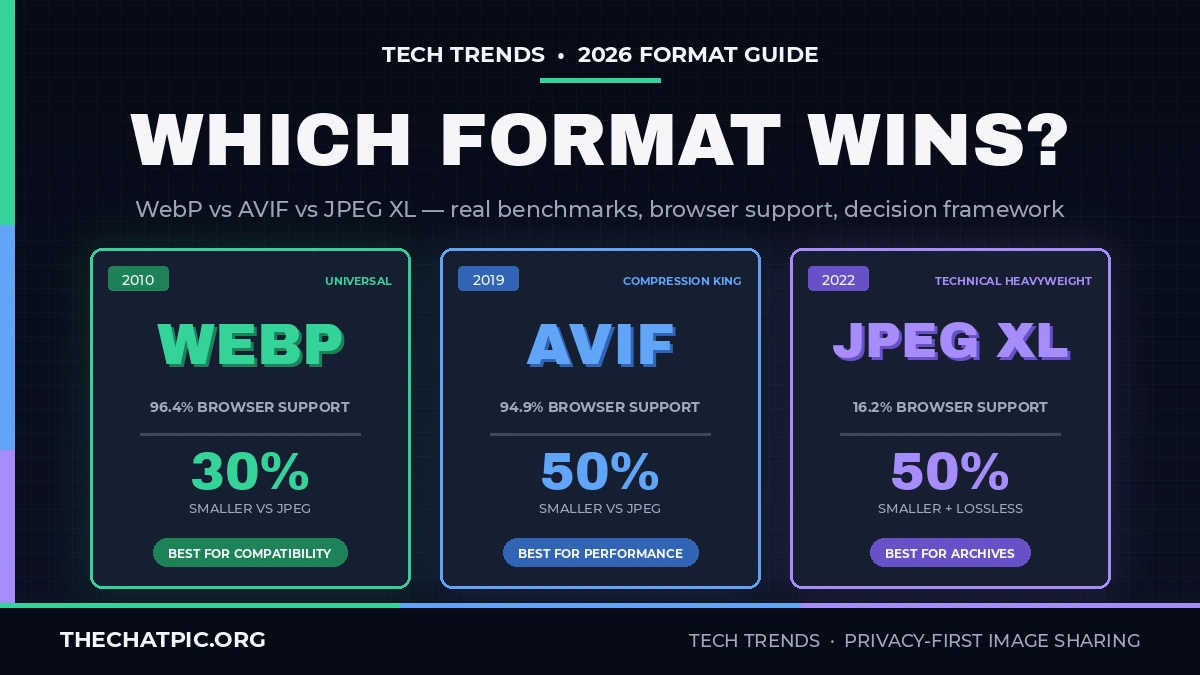
- WebP is the safe, universal choice. Compression is 25-35% better than JPEG. Encoding is fast. Browser support is essentially everyone.
- AVIF is the compression leader. Files are 20-50% smaller than WebP at the same perceived quality. It supports 10-bit and 12-bit HDR, wide color gamut, and animation. The trade-off is significantly slower encoding.
- JPEG XL has the most ambitious feature set: progressive decoding, HDR, wide gamut, transparency, animation, multiple layers, and a killer feature no other format has — lossless recompression of existing JPEGs at roughly 20% smaller with zero quality loss.
The catch is adoption. Two of these three formats work in 95%+ of browsers in 2026. The third works in about 16%, and not in Chrome.
How Do You Choose the Right Format for Your Use Case?
To choose the right image format in 2026, work backwards from where the image will be displayed: web pages → AVIF with WebP fallback, universal compatibility → WebP, print or email → JPEG, photography archive → JPEG XL or original RAW. The biggest mistake is picking a single format for all use cases. The strongest production strategy in 2026 is multi-format: serve AVIF to browsers that support it, WebP to everyone else, and JPEG as a final fallback.
I’ve watched teams agonise over which “winner” to standardise on. The honest answer is that there isn’t one — and the picture element with multiple sources solves the problem cleanly for production sites.
The comparison: WebP vs AVIF vs JPEG XL in 2026
| Feature | WebP | AVIF | JPEG XL |
|---|---|---|---|
| Released | 2010 (Google / VP8) | 2019 (AOM / AV1) | 2022 (ISO standard) |
| Browser support (March 2026) | 96.39% global | 94.9% global | 16.15% (Safari only) |
| Compression vs JPEG | 25-35% smaller | 50% smaller | ~50% smaller + lossless JPEG recompression |
| Compression vs WebP | baseline | 20-50% smaller | comparable, often smaller at low bitrates |
| Color depth | 8-bit | 10-bit, 12-bit HDR | Up to 32-bit float, HDR |
| Transparency | Yes (alpha) | Yes | Yes |
| Animation | Yes (mature) | Yes (less mature in practice) | Yes |
| Encoding speed | Fast (~JPEG speed) | Slow (~4x WebP) | Medium |
| Lossless JPEG recompression | No | No | Yes (~20% smaller, reversible) |
| Best for | Universal web compatibility | Hero images, product photography, HDR | Photography, print, archival |
Step-by-step: How to pick a format
- Is the image going to email, a printable asset, or any third-party software outside the browser? Use JPEG. The compatibility headache is not worth the file-size win.
- Does the image need to display in any browser on any device, with no fallback handling? Use WebP. With 96.39% support across every modern browser and stable five-plus-year decode support, WebP is the safest universal modern format.
- Is the image a hero, large product shot, or anything bandwidth-heavy on a modern site? Use AVIF with a WebP fallback. AVIF gives you the smallest files in 2026 at the cost of slower encoding, which only matters at build time.
- Is the image part of a photography archive, RAW conversion workflow, or print-grade asset? Consider JPEG XL if your viewing environment supports it (Adobe Creative Cloud now reads JPEG XL natively; Safari displays it; Chrome and Firefox still do not).
- Do you have a large existing JPEG archive you want to shrink without quality loss? JPEG XL’s lossless JPEG recompression is the only mainstream option for that workflow.
The multi-format <picture> pattern
In 2026, the cleanest production pattern is to serve all formats from one element and let the browser pick:
<picture>
  <source srcset="image.avif" type="image/avif">
  <source srcset="image.webp" type="image/webp">
  <img src="image.jpg" alt="...">
</picture>
Modern browsers will pick AVIF if available, fall back to WebP if not, and finally JPEG for the long-tail of older clients. This is the strategy I would default to for any production site in 2026.
How Do WebP, AVIF, and JPEG XL Compare on Real Benchmarks?
Real-world benchmarks in 2026 show clear patterns: AVIF produces files roughly half the size of equivalent JPEG and 20-50% smaller than WebP, but encodes about four times slower than WebP. WebP encodes nearly as fast as JPEG and compresses 25-35% smaller. JPEG XL sits in the middle on encoding speed and matches AVIF on compression while uniquely supporting lossless recompression of existing JPEGs. The browser-coverage gap is the single biggest factor that overrides any compression advantage.
These numbers come from Can I Use browser data (March 2026, via StatCounter GlobalStats), Mochify’s published encoder benchmarks, and verification I ran on a sample of photographic and graphic content.
Compression: how much smaller, really?
On photographic content at matched visual quality:
- A 1MB JPEG typically becomes a 650-750 KB WebP (25-35% reduction).
- The same source typically becomes a 400-500 KB AVIF (50% reduction vs JPEG).
- JPEG XL roughly matches AVIF and pulls ahead at lower bitrates for some content types.
For graphic content with sharp edges (UI screenshots, logos, line art), the picture changes. AVIF and JPEG XL handle smooth tonal regions brilliantly but can struggle with sharp transitions at aggressive compression. WebP handles these cases predictably without weird edge cases — a real advantage in batch processing where you cannot inspect every output.
Browser support: the deciding factor
These numbers are from Can I Use based on StatCounter GlobalStats as of March 2026:
- WebP: 96.39% global full support. Every modern browser — Chrome, Edge, Firefox, Safari, Opera — decodes WebP natively without flags. Only pre-2020 browser versions and Internet Explorer miss it.
- AVIF: 94.9% global full support. Chrome 85+, Firefox 93+, Safari 16.1+, Edge 121+, and Opera 71+ all ship native decoders. Safari added AVIF in macOS Ventura / iOS 16.1 in late 2022.
- JPEG XL: 16.15% partial support. Safari 17+ is the only major browser shipping native support. Chrome removed its experimental JPEG XL flag in early 2023 and has not restored it. Firefox keeps it behind a config flag.
The JPEG XL story is the most frustrating because the format is technically excellent. Chrome’s decision in 2023 effectively excluded JPEG XL from the open web. Safari and Firefox followed by quietly adding support, but without Chrome, JPEG XL cannot be deployed as a primary format on a public site.
Encoding speed: matters more than you think
WebP encodes at roughly the same speed as JPEG. AVIF encoding is computationally expensive — typically 4x slower than WebP — because of AV1’s complexity. JPEG XL sits between the two. For a static build-once-serve-forever workflow, encoding speed is not a blocker. For pipelines that process thousands of new images per day, the AVIF encoding cost is a real operational concern.
Mochify’s C-based AVIF encoder runs significantly faster than JavaScript-based encoders like Squoosh, which matters if you’re processing images server-side. For deeper context on image-handling pipelines and how platforms handle re-encoding, the Tech Trends section covers related infrastructure topics.
Feature parity vs feature ceiling
All three support transparency and animation, so the basic checkbox features are even. The differences emerge at the edges:
- AVIF and JPEG XL support 10-bit and higher color depth; WebP is 8-bit only. For HDR displays and professional photography, this is a real gap.
- JPEG XL supports up to 32-bit float color and a wider gamut than AVIF.
- WebP’s animation support is more mature in practice than AVIF’s; for animated content, WebP often produces more reliable results.
What Are the Biggest Mistakes People Make Choosing Image Formats?
The biggest mistakes I see in 2026: picking a single format for all use cases, treating JPEG XL as a viable web format despite Chrome’s exit, over-optimising compression to the point of visible artifacts, ignoring encoding cost in build pipelines, and forgetting that re-encoded uploads strip metadata. Each of these has fixed-cost solutions that most teams overlook — and for shared hosting workflows specifically, the choice of host matters as much as the format (see the Imgur alternatives 2026 ranking for hosts that handle modern formats well).
These misconceptions matter because they translate directly into shipped bytes, broken images, and developer time wasted on the wrong battles.
Mistake 1: Picking one format for everything
The web is multi-format in 2026 whether you embrace it or not. Serving AVIF to Chrome and Safari, WebP to Firefox edge cases, and JPEG to legacy clients is one <picture> element. Standardising on a single format means either accepting suboptimal compression on modern browsers (if you pick WebP) or breaking older clients (if you pick AVIF without fallback). Neither is necessary.
Mistake 2: Treating JPEG XL as web-ready
JPEG XL is technically excellent, but in 2026 it ships in roughly 16% of browser sessions — essentially Safari only. Until Chrome restores support, deploying JPEG XL as a primary web format means breaking images for most of your audience. JPEG XL is brilliant for photography archives, Adobe Creative Cloud workflows, and Safari-only ecosystems. It is not ready as a public-web replacement for AVIF or WebP.
Mistake 3: Over-compressing in the name of optimisation
Lighthouse rewards smaller files, but at aggressive compression levels all three formats produce visible artifacts. WebP shows banding and softening. AVIF can produce blurred or smeared regions. JPEG XL handles low bitrates better than the others but is not magical. Test at the quality level you’re actually shipping, not the one your tooling defaults to.
Mistake 4: Ignoring encoding cost
If your pipeline processes user uploads in real time, AVIF’s 4x-slower encoding can become a real bottleneck. The fix is usually one of: pre-generate AVIF asynchronously after upload (serving WebP synchronously while AVIF generates), use a faster C-based encoder, or skip AVIF for upload pipelines and only use it for static curated assets.
Mistake 5: Forgetting that re-encoded uploads strip metadata
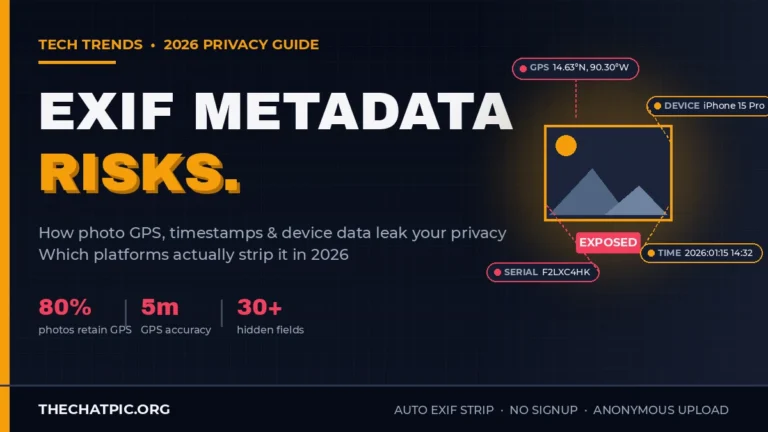
When an image host re-encodes a JPEG to WebP or AVIF on upload, the EXIF metadata typically does not survive the conversion. For some use cases (privacy-first sharing, anonymous uploads) this is the desired outcome — TheChatPic strips EXIF automatically on upload, and re-encoding format is part of the workflow. For other use cases (preserving shoot data for photographers, maintaining copyright tags), it is a quiet data loss that catches people out. The full breakdown of what EXIF carries and how each platform handles it is in the EXIF metadata risks guide.
Frequently Asked Questions
Should I use WebP or AVIF in 2026?
Use AVIF for the smallest files where modern-browser performance matters most, and serve WebP as the fallback for the long tail. With AVIF at 94.9% browser support and WebP at 96.39%, the <picture> element with both sources covers essentially every visitor. WebP alone is acceptable if you cannot afford the AVIF encoding cost in your pipeline.
Is JPEG XL dead?
No, but it is effectively excluded from the open web in 2026 because Chrome removed support in early 2023 and has not restored it. JPEG XL remains viable for photography archives, Adobe Creative Cloud workflows, Safari ecosystems, and any pipeline you control end-to-end. As a public-web primary format, it is not deployable until Chrome reconsiders.
How much smaller is AVIF than JPEG in real numbers?
AVIF consistently produces files roughly 50% smaller than equivalent JPEG at the same perceived visual quality. On a 1MB JPEG, expect roughly 400-500 KB as AVIF. The exact compression depends on content type — photographic content compresses best, sharp-edged UI screenshots and line art compress less aggressively.
Does WebP support transparency and animation?
Yes, WebP supports both. The alpha channel works like PNG transparency, and WebP’s animation support is more mature in production than AVIF’s. For animated content where reliability matters more than compression, WebP often produces better results than AVIF in 2026.
Why did Chrome remove JPEG XL support?
Chrome’s stated reason in early 2023 was insufficient ecosystem interest and limited differentiation from existing formats. The decision drew significant criticism from the imaging community and from Adobe, who continue to support JPEG XL in Creative Cloud. Safari added native support in Safari 17, and Firefox keeps it behind a config flag. Without Chrome, JPEG XL cannot serve as a primary web format.
Can I convert my existing JPEGs to JPEG XL without losing quality?
Yes, this is JPEG XL’s unique feature. Lossless JPEG recompression takes an existing JPEG file and recompresses it to JPEG XL at roughly 20% smaller, fully reversible — you can convert back to the exact original JPEG bytes. No other format supports this. For large JPEG archives where storage cost matters, this is the strongest case for JPEG XL in 2026.
Will using next-gen image formats improve my SEO?
Indirectly yes. Smaller files mean faster page loads, which improves Core Web Vitals scores (specifically LCP) that Google uses as ranking signals. AVIF typically delivers the biggest SEO advantage because of the smallest file sizes. The direct ranking lift is modest; the user-experience lift is real and measurable.
The Bottom Line
The image format war in 2026 is not a war. It is a multi-format reality where AVIF wins on compression, WebP wins on compatibility, and JPEG XL wins on photography features when you can deploy it. The right production strategy serves all three from one <picture> element and lets the browser pick what it can decode.
For new builds in 2026, default to AVIF as the primary format with WebP as the fallback. Keep JPEG in the chain for legacy clients and email contexts. Consider JPEG XL for photography archives and Safari-controlled environments. Run real benchmarks at your shipping quality level rather than trusting defaults — every format produces visible artifacts at aggressive compression, and the right balance is workload-specific.
If your image workflow involves sharing photos online and you want format conversion handled for you alongside automatic privacy protection — EXIF stripping, no signup, controlled link expiry — try ChatPic. The platform handles modern image formats while keeping the privacy layer that direct hosting tools don’t address.